To move your website without downtime, set it up and test it on the new host while the old one keeps running. Then change your domain's DNS to point at the new host, and only cancel the old one once everything checks out.
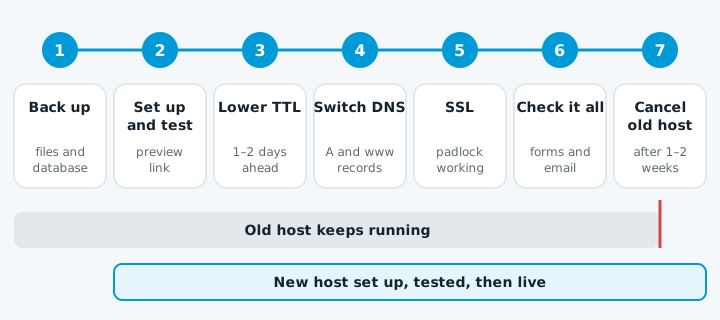
Changing host is not changing domain
Your host stores the website. Your registrar is where you pay for the name, like yourbusiness.co.nz. To move the website, you only change where the domain points. You don't need to transfer the domain.
Moving a .nz domain to another registrar is a separate job that needs an Auth Code from your current provider. If you can't get into your domain account, see how to get your domain back.
Before you start
- Get your logins. You need the old host, the domain registrar, and wherever your DNS is managed. Your registrar account shows which nameservers the domain uses, which tells you where DNS lives.
- Find out where your email is hosted. If it's Google Workspace or Microsoft 365, it stays put, but its DNS records must stay right. If the old web host runs your email, you're moving email too, which is a bigger job.
- Take a full backup. Every file and the database, downloaded to your own computer.
Set up and test on the new host first
Copy the site to the new host and check it before visitors see it. Many hosts give you a temporary preview link. If yours doesn't, editing the hosts file on your computer lets just your computer see the new server under your real domain.
Then test it like a customer would:
- Click through every page.
- Submit the contact form.
- Run a test through any shop or bookings.
WordPress
Use a migration plugin, or do it by hand: copy the files, import the database, and update wp-config.php with the new database details.
If the site's address changes, such as a new domain or http to https, the old address needs replacing in the database. WordPress warns that a plain find-and-replace can break data stored by themes and widgets. Use a search-and-replace plugin or WP-CLI's search-replace command instead.
Lower your TTL a day or two ahead
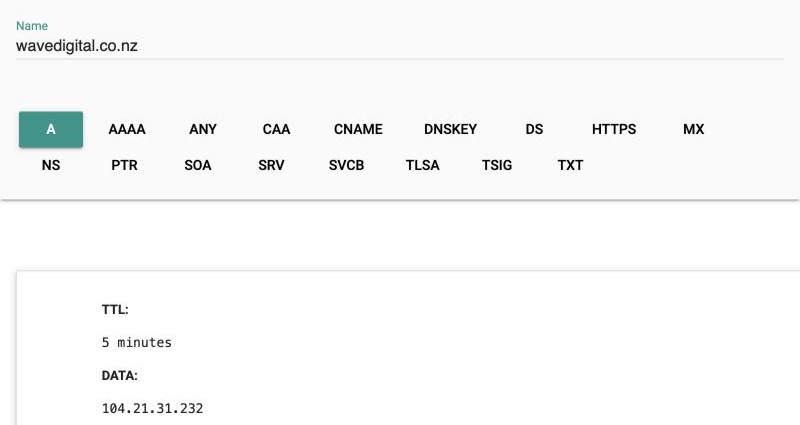
Every DNS record has a TTL, which tells the internet how long to remember it. Google explains that a record's current TTL decides how long a change takes: 86400 seconds means up to 24 hours.
Lower the TTL on the records you'll change a day or two before, so the switch takes effect faster. Raise it again afterwards.
Copy your email records exactly
If you're moving DNS to the new host as well, the new DNS needs every email record from the old one:
| Record | What it does |
|---|---|
| MX | Says where your email is delivered |
| SPF | A TXT record listing who can send as you |
| DKIM | Signs your outgoing email |
| DMARC | Tells other servers what to do with email that fails those checks |
See adding an SPF record and why emails go to junk. If your DNS stays where it is, leave the email records alone.
Switch the website records
- Change the A record to the new host's IP address.
- Change the
wwwrecord, usually a CNAME, as your new host tells you.
While the change spreads, some visitors reach the old site and some the new one, so the old host stays running.
Get the SSL certificate working
The new host needs its own SSL certificate. Many use Let's Encrypt, whose usual check needs the domain to already point at the new server, so the certificate may only appear after the switch.
Ask your host how they handle it, so visitors don't see a warning. See our SSL certificate guide.
Check everything after the switch
- The site loads with the padlock, with and without
www. - Old page addresses still work or redirect to the right place.
- The contact form arrives in your inbox. If it doesn't, see contact form not sending.
- Email still comes and goes.
Keep the old host for a week or two
If something was missed, the old host is your fallback.
When to get help
A small brochure site with email elsewhere is manageable if you're careful. It gets risky when email is on the same host, you have a shop or bookings, or you can't find all the logins. A missing email record can go unnoticed until a customer asks why you never replied.
If the site goes down mid-move, start with the website down checklist. Once you've moved, our free website check looks at your site the way a customer would and sends a test enquiry through your contact form.