If customers keep saying "sorry, it was in my junk folder", the cause is almost always one of five things. The most common one takes about ten minutes to fix once you know it's there.
| Cause | The fix in short |
|---|---|
| 1. Domain not set up | Add SPF, switch on DKIM, add DMARC |
| 2. A service isn't listed | Add it to SPF, or set up its DKIM signing |
| 3. Bad reputation | Secure the mailbox, then ask to come off blacklists |
| 4. The email looks like spam | Skip image-only emails, short links and risky attachments |
| 5. The customer's own filter | Ask them to mark you "not junk" |
1. Your domain isn't set up to prove the email is really from you
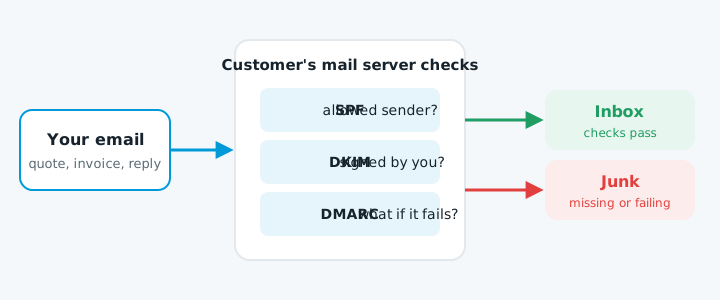
Before a mail server accepts your email, it looks up three settings on your domain:
| Setting | What it does |
|---|---|
| SPF | Lists the services allowed to send email as your domain, such as Google Workspace, Microsoft 365, Xero or your newsletter tool |
| DKIM | Adds a digital signature to each email, proving it really came from you and wasn't changed on the way |
| DMARC | Tells the receiving server what to do when an email fails those checks |
If any of these are missing or wrong, Gmail and Outlook are far more likely to put your email in junk, or reject it outright. Many NZ business domains were set up years ago and never had them.
How to check: any online "DMARC checker" or "SPF lookup" tool will read your domain's settings. Our free website check covers them too, along with the rest of your site.
How to fix: add or correct your SPF record, switch on DKIM in Google Workspace or Microsoft 365, and add a DMARC record.
2. A service sending as you isn't listed
Xero, MYOB, your website's contact form, booking systems and newsletter tools often send email "from" your address. If one of them isn't included in your SPF record or signed with DKIM, its emails fail the checks even though your normal email is fine.
That's why a common pattern is "my emails are fine, but my invoices go to junk".
Fix: add that service to your SPF record, or set up its DKIM signing. Each service's help pages explain how.
3. Your mailbox or domain has a bad reputation
If your mailbox was hacked and used to send spam, or someone has been sending spam pretending to be your domain, receiving servers may distrust everything from you for a while.
Signs: sudden bounce-backs mentioning "blocked", "blacklisted" or "reputation". Our article on bounce-back errors explains what each one means.
Fix: change the password, switch on two-factor sign-in, check for hidden forwarding rules, then ask to be removed from any blacklist you're on.
4. What's in the email looks like spam
Filters also read the email itself. Watch out for:
- An email that's one big image, or just a link
- Shortened links (bit.ly and similar)
- Lots of capitals, exclamation marks or "FREE" in the subject
- Attachments like .zip files, or Word documents with macros
A normal quote with a PDF attached is fine. Content is rarely the main cause for business email, but it can tip a borderline email into junk.
5. It's the customer's own filter
Sometimes one person's company has strict filtering, or they once marked a similar email as junk. If only one customer has the problem, ask them to mark your email as "not junk" and add you to their contacts.
Where to start
- Check your domain's SPF, DKIM and DMARC with a DMARC checker, or ask for our free website check.
- Fix any problem with those first. They're the most common cause by far.
- If everything passes and it still happens, look at the services sending as you (point 2) and bounce-back messages (point 3).