If your contact form has gone quiet, test it now: fill it in yourself and see whether the email turns up. Most broken forms fail silently, so every lost enquiry is a customer who thinks you ignored them, and you never hear about it.
Test it right now
- Open your website on your phone, not logged in.
- Fill in the contact form with your name, a personal email address (not your business one) and a message like "Test, please ignore".
- Submit it and note the time.
- Check the inbox the form is meant to send to. Then check junk, spam and any "Other" or "Promotions" tab.
| What happened | What it means |
|---|---|
| Arrived in the inbox within a few minutes | You're fine |
| Landed in junk, or didn't arrive at all | Read on |
If you're on WordPress
Check whether the enquiry was saved
Some form plugins keep a copy of every entry in WordPress, so you can see what you've missed even if the email never went out.
| Plugin | Does it save entries? |
|---|---|
| Contact Form 7 | Not at all. Its author makes a free add-on, Flamingo, that saves them |
| WPForms | On its paid plans. The free Lite version emails them and doesn't keep them in WordPress |
| Gravity Forms | Yes, under Forms, then Entries |
If your test entry is saved but no email arrived, the form works and the email is the problem.
If it isn't saved either, the form itself is broken. Try it with your plugins up to date, and check for an error message after you press send.
Fix how WordPress sends email
By default WordPress sends email through the web server's own PHP mail function. Many hosts don't set that up properly or limit it. The emails also carry no proof they came from your domain, so they get rejected or sent to junk.
The usual fix is an SMTP plugin such as WP Mail SMTP or FluentSMTP. It makes WordPress send through a real mailbox (your Google Workspace or Microsoft 365 account) or a sending service, which signs the email properly.
Check the From address
The form's email should come from your own domain, such as website@yourbusiness.co.nz, with the visitor's address in the Reply-To field so you can still just hit reply.
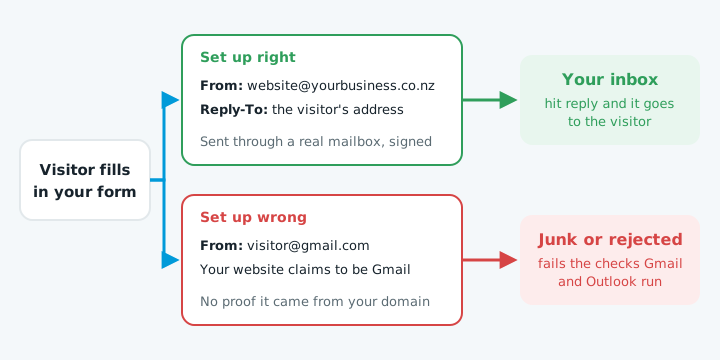
If a customer at Gmail fills in your form, your website is claiming to be Gmail, and the receiving server can see it isn't. Gmail requires every sender to pass SPF or DKIM, and larger senders must also have DMARC, with the From domain matching. Our guides to SPF records and DMARC explain those settings, and why emails go to junk covers the rest.
Check the notification address
Open the form's settings and look at where notifications go. It's often an old staff member's address, a typo, or a mailbox nobody checks any more. If emails to that address are bouncing, see emails bouncing back.
If you're on Wix or Squarespace
The sending side is handled for you, so the problem is usually the settings.
- Wix. Go to the form's settings and check who gets notified about submissions. Submissions also show in your Wix dashboard, so look there for anything you missed.
- Squarespace. Click the form block, open its settings and check the Storage tab. Make sure an email address is entered for notifications, and that it's the right one. Squarespace keeps submissions in your dashboard, but without that email you'll only see them if you go looking.
In both cases, check junk for the notification emails and mark them as not spam.
Keep it working
- Send a test enquiry once a month. Put it in your calendar. Forms break after a plugin update, a changed email password or a new spam filter, and a monthly test catches it within weeks rather than months.
- Try the form on a phone. If you've added a spam check like reCAPTCHA or Cloudflare Turnstile, make sure a real person can still get through it easily.
- Turn on entry storage if your form plugin offers it, so an email problem never loses the enquiry itself.
When to get help
If your test enquiry doesn't arrive and the steps above don't fix it, the cause is usually in the SMTP setup or your domain's email settings. Our free website check sends one test enquiry through your form, clearly marked as a test, and tells you whether it reached you and what needs fixing.
Regular form testing is part of website maintenance, and it's worth asking whoever looks after your site when they last tested yours.