When your website won't load, the cause is usually one of six things, and you can rule most of them out in five minutes. Work down this list in order.
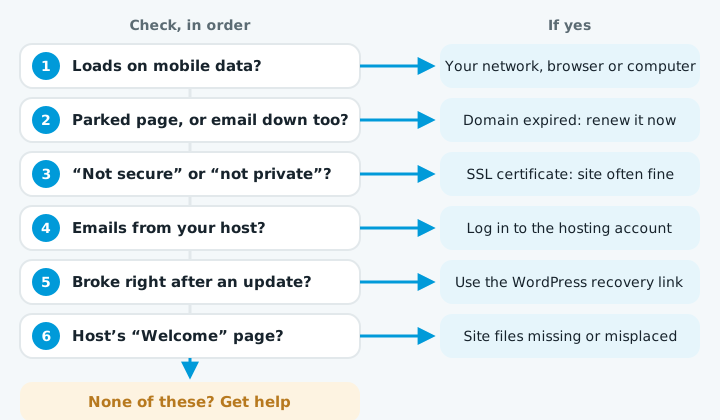
1. Is it down for everyone, or just you?
Try the site on your phone with Wi-Fi switched off, so you're on mobile data. You can also use any "is it down for everyone" checker website.
If it loads there: the problem is your office network, browser or computer, not the website.
2. Has the domain expired?
An expired domain is one of the most common causes, and the easiest to fix. Signs:
- The site shows a "parked" page or ads from your registrar
- Your email has stopped working at the same time
If so: log in to your domain registrar and check the expiry date. If it's lapsed, renew it straight away.
3. Does the browser show a security warning?
Messages like "Your connection is not private" or "Not secure" usually mean the SSL certificate has expired or isn't set up for this address. The site itself is often fine underneath.
If you see one: most hosts renew certificates automatically, but it can fail after a domain or hosting change. See what an SSL certificate is for more.
4. Has the hosting stopped?
Check your email for messages from your web host about:
- An unpaid invoice or a failed card payment
- The account being suspended (sometimes for malware)
- Planned maintenance or an outage
If so: log in to your hosting account. A suspended account usually says so clearly.
5. Did something change just before it broke?
If the site broke right after a WordPress, plugin or theme update, that update is the prime suspect. You might see:
- "There has been a critical error on this website"
- A blank white page
- "Error establishing a database connection"
If it was an update:
- Check the admin inbox. WordPress often emails the site's admin address a recovery link when a critical error happens.
- Click the recovery link and log in.
- Switch off the plugin that caused it.
6. Is it showing the hosting company's default page?
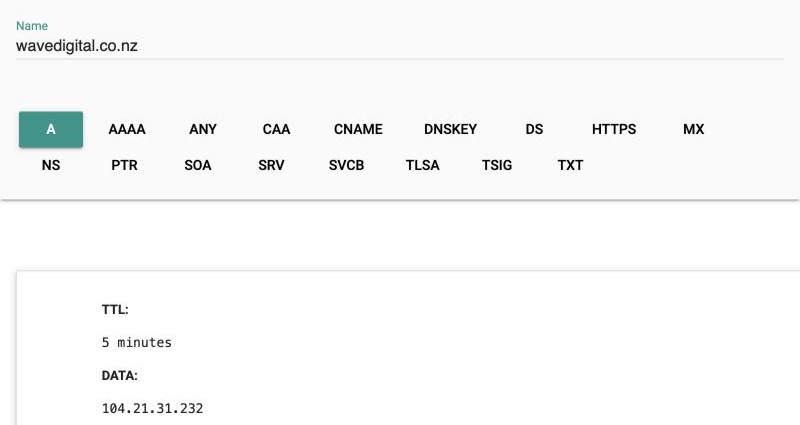
If you see a generic "Welcome" or "This site is under construction" page from your host, the domain is pointing at the right server but the site files are missing or in the wrong place. This often happens after a hosting move. To see which server the domain points at, look up its A record.
Still down?
If none of these explain it, or you'd rather not dig through hosting panels, get in touch and we'll take a look.
Stop it happening again
Most outages come from things nobody was watching: an expiring domain, a failed certificate renewal, an update gone wrong. Our Safe plan watches all of them for you, with monitoring that tells us the moment your site goes down.