A default page means a web server answered, but it didn't find your website. Either the site's files are missing or in the wrong folder, or your domain is pointing at a server that doesn't hold your site.
The page you see tells you which.
| What you see | What it usually means |
|---|---|
| Your host's name, or a cPanel or Plesk logo | The server has nothing to show for your domain |
| "Index of /" and a list of files | The folder has no homepage file |
| "Apache2 Default Page" or "Welcome to nginx!" | Your domain points at a different server |
| A parked page or registrar ads | The domain has probably expired |
| "Account suspended" | Your host has switched the account off |
A host welcome or "under construction" page
The server has nothing to show for your domain. Common causes:
- A new hosting account that's still empty. cPanel puts its own placeholder in a new account until real files go in.
- Files in the wrong folder. In cPanel, the main domain's files belong in
public_html. Each extra domain on the account has its own folder, listed under Domains with its document root. Files uploaded one level too deep, such aspublic_html/mysite/, won't show at your address. - The domain is switched off. Plesk shows its default page when a domain is disabled in the panel.
- DNS points at the wrong IP address. If your domain points at the host's shared address rather than the one your account uses, the server can't match the request to your site.
To fix it:
- Open your hosting panel's file manager.
- Look in your domain's document root.
- If it's empty, the site needs uploading or restoring from a backup. If the files are in a subfolder, move them up a level.
"Index of /"
The server found the folder but no homepage file in it. Apache looks for a file such as index.html or index.php, and if there isn't one it can list the folder instead.
Check the file is there and spelt correctly. A WordPress site needs index.php in the document root. If it's gone and you weren't expecting a change, read what to do if your site's been hacked before you restore it.
"Apache2 Default Page" or "Welcome to nginx!"
These are the pages a web server shows straight after it's installed. They're not from your hosting panel, so your domain is most likely pointing at a different server, often an old one or a fresh one that was never finished.
This usually follows a move to a new host where the DNS change went to the wrong address.
A parked page or registrar ads
For a .com, the rules say a parking page shown after expiry has to say the domain has expired and explain how to renew it.
Log in to your registrar and check. If it has lapsed, see what to do when your domain expires.
"Account suspended"
The usual reasons are:
- an unpaid invoice
- going over the plan's limits
- breaking the host's terms
- a hacked site.
Check your email for a message from the host. If it was a payment, paying usually brings the site back. If it was malware, the host will want it cleaned first.
Check where your domain points
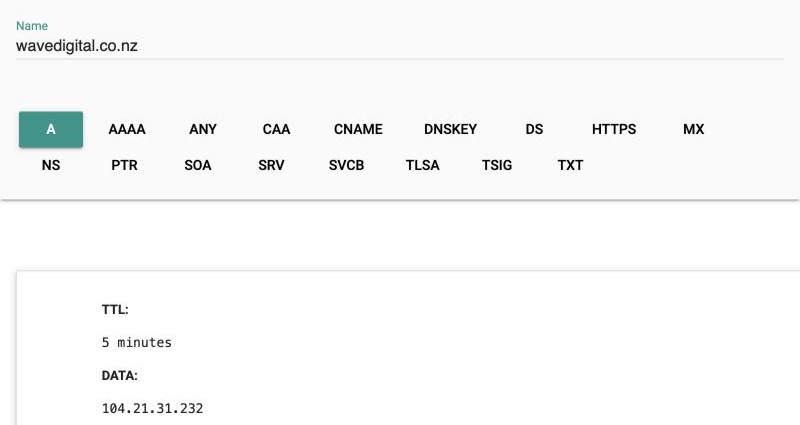
- Look up the A record. Go to Google Admin Toolbox Dig, enter your domain and look up the A record. That's the IP address your site is served from.
- Check
wwwtoo, as it can point elsewhere. - Compare the address with the one in your hosting panel or welcome email. If they don't match, change the A record wherever your DNS is managed.
If the browser shows a security warning instead of a default page, see SSL certificates.
When to get help
If the files are there, DNS matches and the default page still shows, the problem is in the server's setup, and that's your host's job. Send them your domain, the IP it points to and a screenshot of the page.
Get help sooner if your site and files have gone with no backup, or the account was suspended for malware. For the quick checks, start with the website down checklist.
Once it's back, our free website check looks at your site the way a customer would and sends a test enquiry through your contact form.