If your website has been hacked, don't start deleting things. Tell your host, change every password, then work out how they got in before you clean up, or it will happen again.
Signs your site has been hacked
- Visitors get sent to spam, gambling or fake pharmacy sites
- Google or Chrome shows "This site may be hacked" or "Deceptive site ahead"
- Your host has suspended the account, often with an email mentioning malware
- There are admin users in WordPress you don't recognise
- Searching
site:yourdomain.co.nzin Google shows pages you never made, often in another language
The first hour, in order
- Tell your host. Ask whether they can see what happened, whether they have backups from before the hack, and whether other sites on your account are affected.
- Change your passwords. Do it from a computer you trust, using a new, different password for each, in the order shown below.
- Turn on two-factor login. Switch it on for the hosting account, the domain registrar and your email. Add a two-factor plugin to WordPress if you don't have one.
- Check for unknown admin users. In WordPress, go to Users and filter by Administrator. Write down any you don't recognise, then remove them. Hackers often add one so they can get back in after you clean up.
- Take a copy for evidence. Download a copy of the files and database as they are now, before you change anything else. It helps whoever cleans up find the way in.
- Check whether customer information was involved. See the next section.
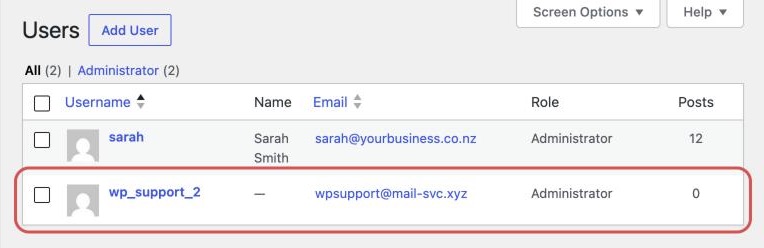
For step 2, change the passwords in this order:
| Order | Password to change |
|---|---|
| 1 | Your hosting account |
| 2 | Every WordPress admin user |
| 3 | FTP or SFTP, and the database password |
| 4 | The email accounts tied to the site and the domain |
Customer information and who to tell
If your site holds customer details (enquiry forms, accounts, orders), assume they may have been seen.
Under the Privacy Act 2020, if a breach has caused or might cause serious harm to the people affected, you must report it to the Privacy Commissioner and tell those people. The Commissioner asks for this within 72 hours of you knowing, even if you're still investigating. See the Privacy Commissioner's guidance.
| Who to tell | When | How |
|---|---|---|
| Privacy Commissioner | Serious harm caused or likely | The NotifyUs form, within 72 hours |
| The people affected | Serious harm caused or likely | Tell them directly |
| National Cyber Security Centre (NCSC), which now includes what used to be CERT NZ | You can also report it | ncsc.govt.nz/report or 0800 114 115 |
| Your customers | The hackers got into your email too | Warn them |
A hacked mailbox is a common start to fake invoice scams.
Cleaning it up
There are two honest options.
| Option | What it involves | The catch |
|---|---|---|
| Restore a clean backup from before the hack | Then update WordPress, the theme and every plugin straight away, and delete any you don't use | Hackers often get in weeks before anything shows, so the backup may already be infected |
| Pay someone to clean it | They find the infected files and database entries, close the hole, and check nothing is left behind | You give them access to the hosting |
A reinstall or restore without finding the way in often gets hacked again within days. The usual way in is an old plugin, a weak password or a leaked login, and it's still there after the restore.
After the cleanup
If Google flagged the site, open Google Search Console and go to Security issues. Once every issue is fixed across the whole site, click Request review and say what you found and what you did. Google says reviews can take several days or weeks.
Watch the site closely for the next few weeks. If spam pages or new admin users come back, the hole is still open.
Stopping it happening again
- Update every week. WordPress, the theme and plugins.
- Keep daily backups off the server, so a hack can't delete them.
- Use two-factor logins and a different password for every account.
- Have something watch the site and tell a person when it changes or goes down.
That's most of what website maintenance covers. If the site is down rather than hacked, try the website down checklist.
When to get help
Cleaning up a hack properly is hard. Malware hides in the database, in files with harmless names, and in scheduled tasks that reinstall it. Missing one piece means doing it all again. If customer data might be involved, you also need to know what was taken before you can report it properly.
Having someone do it means giving them access to the hosting, letting them take the evidence copy, clean the site, close the way in, update everything and send the Google review request.
If you're not sure whether your site is affected, start with our free website check.