When an email can't be delivered, you get a bounce-back message, often titled "Undeliverable", "Delivery Status Notification (Failure)" or "Mail delivery failed". Buried in it is a code that tells you exactly what went wrong.
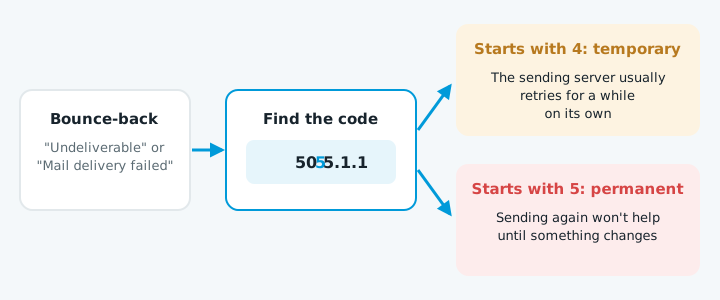
Find the code
Look for a three-digit number followed by something like 5.1.1. For example:
550 5.1.1 The email account that you tried to reach does not exist.
The first digit tells you whether it will sort itself out:
- Codes starting with 5 are permanent failures. Sending again won't help until something changes.
- Codes starting with 4 are temporary. The sending server usually retries for a while on its own.
The common ones
| Code | What it means | What to do |
|---|---|---|
550 5.1.1 |
The address doesn't exist | Check for a typo, or ask the person for their current address |
552 5.2.2 |
Their mailbox is full | Try again later, or contact them another way |
550 5.7.1 |
Rejected by their server's rules | Often your domain's SPF, DKIM or DMARC, or a blacklist. Check them with a DMARC checker |
550 5.7.26 (Gmail) |
Your email failed Gmail's authentication checks | Fix SPF, DKIM and DMARC on your domain |
550 5.7.515 (Outlook) |
Your domain doesn't meet Microsoft's authentication requirements | Fix SPF, DKIM and DMARC on your domain |
554 5.7.1 mentioning "blocked", "blacklist" or "reputation" |
Your server or domain is on a blocklist | Find which list, fix the cause, then request removal |
421 4.7.0 |
Temporarily deferred | Usually resolves on its own. If it keeps happening, check your authentication |
If many emails are bouncing at once
A sudden wave of bounces, especially ones mentioning authentication or blacklists, usually means one of two things:
| Likely cause | What to do |
|---|---|
| Your domain's email settings are missing or broken | See why emails go to junk and how to add an SPF record |
| Your mailbox has been sending spam | Follow the steps below |
If your mailbox has been sending spam:
- Change your password now.
- Switch on two-factor sign-in.
- Check for forwarding rules you didn't create.
If you're getting bounces for emails you never sent
That's someone sending spam that pretends to come from your domain, and the bounces come back to you.