There are two different problems here. Either Google doesn't have your site in its index at all, or it does but your site doesn't come up for the words you search. The first is often a setting you can fix today. The second takes longer.
1. Do a site: search
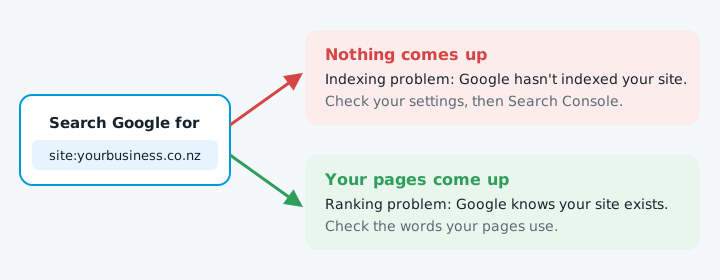
Search Google for site:yourbusiness.co.nz, using your own domain, with no space after the colon.
| What you see | What it means | What to do |
|---|---|---|
| Nothing comes up | Google hasn't indexed your site | Work through steps 2 to 4 |
| Your pages come up | Google knows your site exists | It's a ranking problem, covered further down |
It's a rough check. Google says a site: search doesn't necessarily show every page it has indexed.
2. Check whether your site is telling Google to stay away
On WordPress, go to Settings, then Reading, and look under "Search engine visibility".
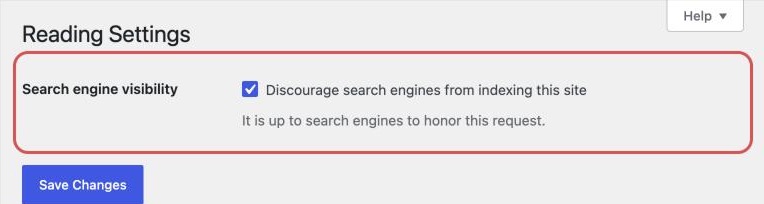
While it's ticked, WordPress adds a noindex tag to every page, and the Dashboard's At a Glance box shows "Search engines discouraged". Google drops any page with a noindex tag once it crawls it.
On Wix, Squarespace and other builders, check each page's SEO settings for an option that hides it from search.
On any site, open yourbusiness.co.nz/robots.txt and look for Disallow: /. That tells search engines not to crawl the whole site.
3. Set up Google Search Console
Search Console is Google's free tool for site owners. It shows you what Google sees.
- Add your site as a property. A Domain property is verified with a DNS record at your domain provider. A URL-prefix property can use an HTML file or a tag on your home page instead.
- Open the Page indexing report. It splits pages into indexed and not indexed, with a reason for each one that isn't, such as "URL marked 'noindex'", "URL blocked by robots.txt", "Not found (404)" or "Crawled - currently not indexed".
- Inspect your home page. Paste its address into the URL Inspection box at the top. It says whether that page is on Google.
- Request indexing once it's fixed. Click Request indexing. There's a quota, and asking twice for the same page won't speed it up.
- Submit your sitemap. Do this under Sitemaps. WordPress and Wix usually make one for you. Google treats it as a hint, not a promise.
4. Give it time if the site is new
Google says it can take a few weeks to notice a new site. If yours launched last week and Search Console shows no errors, waiting may be the fix.
Google also says sites get missed when no other sites link to them. Get listed in a few genuine places, such as your industry association.
If it's indexed but doesn't come up
If the site: search shows your pages, Google can see them. It just doesn't rank them highly for what you typed. Search Console's Performance report shows the searches you do appear for and your average position.
- Do your pages use the words customers use? If you say "residential electrical services" and people search "electrician Tauranga", say that too.
- Are you searching for something local? The map results come from your Google Business Profile, not your website. Our setup guide walks through it.
If it was there and disappeared
When a site that used to show up drops out, something usually changed:
| What changed | What goes wrong | Where to look |
|---|---|---|
| A redesign or rebuild | It went live with "Discourage search engines" still ticked, or with noindex left on from the staging site |
Step 2 above, first |
| The site moved | A new address or platform without redirects from the old page addresses. Google recommends permanent redirects from old URLs to new ones | Moving to a new host |
| The site was hacked | Search Console's Security issues report shows what Google has found | Website hacked and website redirects to spam |
| A manual action | A Google reviewer decided your site breaks its spam policies, so pages can be ranked lower or removed | The Manual actions report. Fix the problem, then send a reconsideration request |
When to get help
If Search Console shows errors you can't make sense of, or your site vanished after a move or a hack, get someone who has fixed it before. Every week out of Google is a week of enquiries going elsewhere.
If you'd like a second opinion first, start with our free website check. Checking indexing after every change is also part of good website maintenance.