When someone searches "plumber near me" or "lawn mowing Hamilton", the businesses on the map at the top come from Google Business Profiles. It's free, and for a lot of trade and service businesses it's where new customers find them first. Here's how to set it up so it works.
1. Claim or create the profile
- Go to business.google.com and search for your business name.
- Claim it if it's there. Google may already have a profile for you, built from public information. If not, create one.
- Use a Google account the business controls, not a staff member's personal one, so you don't lose it when someone leaves.
2. Get verified
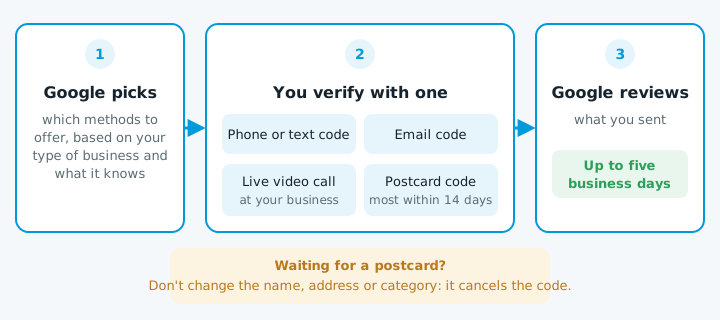
Until it's verified, the profile won't show properly. Google chooses which verification methods to offer you, based on your type of business and what it can already find out about you. According to Google's help page, the options include:
- A phone call or text with a code.
- An email with a code.
- A live video call with Google support, at your business, showing things like your signage, tools or vehicle.
- A postcard with a code, posted to your address. Most arrive within 14 days, and codes expire after 30.
Google then reviews what you sent, which can take up to five business days.
3. Hide your address if customers don't come to you
If you work from home and go to your customers, you're a service-area business. Google's rules for service areas say to remove your address from the profile if you don't serve customers there. Your home address stays private, and the profile shows the areas you cover instead.
You can add up to 20 service areas, by town, suburb or postcode. Keep them to where you actually work: Google says the whole area shouldn't stretch much beyond about two hours' drive from your base.
4. Fill in every section
| Section | What to put |
|---|---|
| Business name | Your real name, exactly as on your van and invoices. Adding keywords ("Smith Plumbing – Best Plumber Hamilton") breaks Google's rules and can get the profile suspended |
| Category | The primary category matters most. Pick the closest match ("Plumber", "Electrician", "House cleaning service"), then add a few secondary ones |
| Phone number and website | The ones you answer and want customers to use |
| Hours | Including when you take calls, and holiday hours when you're away |
| Services | The jobs you do, in the words customers use |
| Photos | Real photos of your work, your van and your team. Profiles with photos look more trustworthy than ones without |
5. Get reviews, the right way
Reviews are what most people read before they ring.
- Ask every customer at the end of the job, not only the ones you expect to be happy. Google bans picking and choosing.
- Send a direct link. The profile has an "Ask for reviews" option that gives you one to text or email.
- Reply to reviews, good and bad. A calm, short reply to a bad review often does more for the next customer than the review did harm.
6. Keep it up to date
A profile that's set up and left goes stale.
- Change the hours when they change.
- Add new photos now and then.
- Check it every month or so. Anyone can suggest edits to your profile, and Google can apply them.
If something goes wrong
If your profile is suspended, don't create a new one: that makes it worse. Check the profile against Google's guidelines (name, address and category are the usual problems), fix what's wrong, then ask for a review through Google's appeals tool.