Your site runs on a version of PHP that no longer gets security fixes, or soon won't. Upgrading is usually a setting in your hosting control panel, but back up and update your plugins first, because an out-of-date plugin can stop working when PHP changes.
What PHP is and why your host cares
PHP is the programming language WordPress is written in. It runs on your host's server, not inside WordPress, so WordPress can't update it for you.
Each PHP version gets two years of bug and security fixes, then two more years of security fixes only. After that it's end of life and gets nothing.
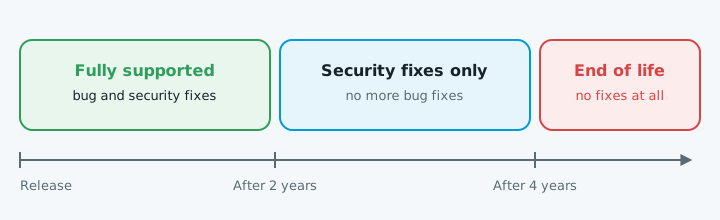
As of October 2026, according to php.net:
| Version | Status | Security fixes until |
|---|---|---|
| 8.5 | Fully supported | 31 Dec 2029 |
| 8.4 | Fully supported | 31 Dec 2028 |
| 8.3 | Security fixes only | 31 Dec 2027 |
| 8.2 | Security fixes only | 31 Dec 2026 |
| 8.1 and older | End of life | Ended 31 Dec 2025 or earlier |
PHP 7.4 reached end of life in November 2022. WordPress recommends PHP 8.3 or newer and says older versions may expose your site to security holes.
Hosts push upgrades because an unpatched version is a risk to their servers as well as your site. Some charge to keep old versions running. IONOS, for example, sells a monthly "PHP Extended Support" add-on for versions up to 8.1.
1. Check which version you're on
In WordPress, go to Tools > Site Health > Info and open the Server section. The PHP version is listed there.
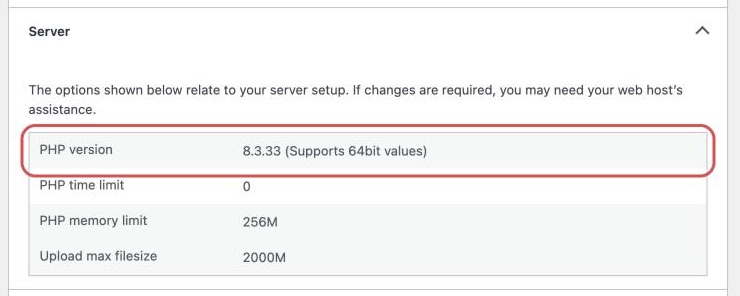
If it's out of date, the Status tab may show "Your site is running an outdated version of PHP, which requires an update", and the dashboard may show a "PHP Update Required" box. Your hosting control panel shows the version too.
2. Back up the whole site
Files and database, kept somewhere other than the server. If the upgrade goes badly, this is how you get back.
3. Update WordPress, the theme and plugins first
Go to Dashboard > Updates and update everything, one plugin at a time, checking the site after each. Newer plugin versions are more likely to work with newer PHP.
If a plugin update breaks something, see what to do when a plugin update breaks your site.
4. Look for plugins that might not cope
- Plugins from WordPress.org. Look for ones that haven't been updated in a year or more. On each plugin's WordPress.org page, check "Last updated" and the changelog.
- Paid plugins and themes. Check the developer's site for PHP 8 support.
If a plugin looks abandoned, replace it before you switch.
5. Switch, then test straight away
If your host gives you a staging site, switch PHP there first and test it. Otherwise, pick a quiet time and switch on the live site.
On cPanel hosting:
- Open MultiPHP Manager.
- Tick your domain.
- Choose a version from the PHP Version menu.
- Click Apply.
Other hosts call it "Select PHP Version" or similar, or you can ask them to do it. If you're a long way behind, go up in steps, testing each time.
After each switch, check:
- The home page and a few inner pages.
- The contact form: send a test enquiry.
- Logging in to wp-admin.
- Anything that takes money or bookings.
If it breaks
You'll usually see "There has been a critical error on this website", a blank white page, or a feature that quietly stops working. WordPress may also email the admin address with the name of the plugin that failed.
Then deal with the plugin that failed: update it, replace it, or ask its developer. If switching back doesn't fix it, WordPress advises asking your host to restore the previous PHP version, then restoring your backup.
Only stay on the old version long enough to fix the problem.
When to get help
Get someone in if:
- Your site was built years ago and nobody knows what's in it.
- A plugin you rely on has no PHP 8 version and there's no obvious replacement.
- The theme itself is the problem. Fixing that can mean changing code.
- The site broke and switching back didn't fix it. Check it hasn't been hacked.
- Your host doesn't let you change versions and you're thinking of moving host.
Keeping PHP current is part of ordinary website maintenance. If you're not sure where your site stands, our free website check will show you what's out of date.