Start with the "Lost your password?" link on the login page. If the email doesn't arrive, or you can't find the login page at all, you can still reset the password through your hosting, or ask your host to do it.
| If this is your problem | Start with |
|---|---|
| You've forgotten the password | Step 1 |
| The login page has gone missing | Step 2 |
| You're locked out after too many tries | Step 3 |
| The reset email never arrives | Step 4 or 5 |
| You don't have the hosting login either | Who controls the site, below |
| Someone else changed your password | Treat it as a hack, below |
1. Use "Lost your password?"
Go to yoursite.co.nz/wp-login.php and click Lost your password? Enter your username or the email address on your account. WordPress emails you a link to set a new password.
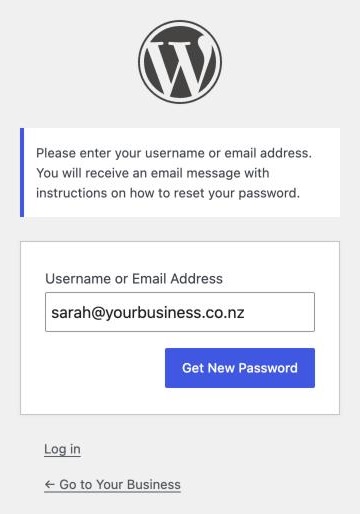
If nothing arrives, check spam first. Then think about which email address is on your account. It's often the designer who built the site, or a staff member who has since left. The email goes there, not to you.
Some sites don't send email at all, because the server isn't set up to send mail from WordPress. Then password resets and contact form messages go nowhere, and you'll need one of the hosting methods below.
2. Check you're on the right login page
The usual login pages are /wp-login.php and /wp-admin/. Some security plugins move the login page to a secret address, such as /my-login/, and stop the usual addresses working.
Look for a bookmark or an old email from whoever set the site up. Failing that, switch the plugin off through your hosting:
- Open your hosting file manager or FTP and go to
wp-content/plugins/. - Rename the plugin's folder, for example
wps-hide-logintowps-hide-login-off. WordPress deactivates it and the normal login page works again. - Log in, then rename it back and note the login address.
3. Locked out after too many tries
Security plugins such as Wordfence lock you out after a number of failed logins. The lockout lasts a set time, so the simplest fix is to wait. Wordfence's lockout page also has an option to email an unlock link to the admin.
If you can't wait, rename the security plugin's folder in wp-content/plugins/ the same way as above. Turn it back on once you're in. If a plugin update has stopped the login page working, see a plugin update broke my WordPress site.
4. Reset the password through your hosting
These need access to your hosting account.
phpMyAdmin
Most hosting control panels have it.
- Open your WordPress database, then the
wp_userstable (the prefix may be different). - Find your username under
user_loginand click Edit. - Delete what's in
user_passand type your new password. - Choose MD5 from the function dropdown next to it, and click Go.
MD5 isn't a safe way to store a password, but WordPress swaps it for a stronger hash the first time you log in.
WP-CLI
If your host gives you command line access, wp user list shows the users and their ID numbers. Then:
wp user update 1 --user_pass=your-new-password
Change 1 to your user's ID.
Your theme's functions.php
In the file manager, open your active theme's functions.php and add this line just after the first <?php:
wp_set_password( 'your-new-password', 1 );
The 1 is the user ID, usually the first admin.
Once you're in, check your account's email address is one you read.
5. Ask your host
Your hosting company can usually reset a WordPress password for you. Ask from the email address on the hosting account, so they know the request is genuine.
If you don't have the hosting login either
Then the real problem is who controls the site. If a former designer set up the hosting in their name, you'll need them to hand it over, or you'll need to move the site to hosting in your name.
The same goes for the domain: see how to get your domain back from a web designer. Once both are in your business's name, you can move the website to a new host if you want to.
If someone else changed your password
Follow the steps in my website has been hacked.
When to get help
Get someone in if you can't get into the hosting account, or if the database and code steps make you nervous. A mistake in either can take the whole site down.
If you're not sure who controls your site, or what state it's in, our free website check is a good place to start.