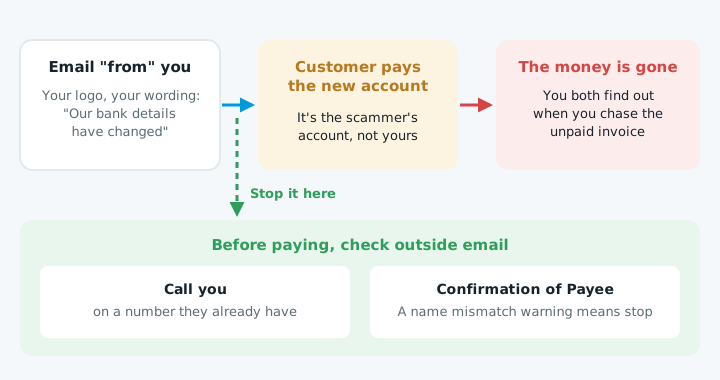
An invoice scam goes like this: your customer gets an email that looks like it's from you, with your logo and your usual wording, saying your bank details have changed. They pay the new account. The money is gone, and both of you find out when you chase the unpaid invoice.
In a BNZ survey of 483 small businesses in September 2025, one in ten had run into invoice scams involving changed bank details.
How scammers send email "from" you
There are three ways, and each needs a different fix:
- Spoofing your exact address. Email lets anyone type any "From" address. Unless your domain tells other mail servers how to spot fakes, an email claiming to be from
accounts@yourbusiness.co.nzcan land in your customer's inbox. Fix 1 covers this. - A lookalike domain. The scammer registers something close, like
yourbusinesss.co.nzoryourbusiness-nz.com, and sends from that. Fix 3 covers this. - Your real mailbox. Someone gets your email password, reads your invoices, and replies from your actual account at the right moment. They often set up a hidden rule that forwards or hides replies. Fix 2 covers this.
Fix 1: Stop spoofing with SPF, DKIM and DMARC
These three settings on your domain let receiving servers check that an email really came from you:
| Setting | What it does |
|---|---|
| SPF | Lists the services allowed to send as your domain |
| DKIM | Signs each email so it can't be forged or changed |
| DMARC | Tells receivers to junk or block anything that fails |
With DMARC set to quarantine or reject, fake email using your exact address gets junked or blocked instead of delivered. See DMARC explained and how to add an SPF record. These settings also help your real invoices reach the inbox; see why emails go to junk.
Fix 2: Lock down your mailbox
- Switch on two-factor sign-in for everyone's email: Google Workspace and Microsoft 365 both have it.
- Check for forwarding and inbox rules you didn't make. Scammers use them to hide your customers' replies.
- Use a different password for email from every other account.
The National Cyber Security Centre gives the same advice for business email compromise.
Fix 3: Make changed bank details hard to fall for
- Say it on every invoice: "Our bank details will never change by email. If you get a message saying they have, call us on 021 ..." Use a number they already have.
- Put your bank details on your website, on a page customers can check before they pay.
- Tell customers about Confirmation of Payee. NZ's main banks now check whether the account name matches the number before a payment goes through. A mismatch warning is a reason to stop and ring you.
- Do the same in reverse. If a supplier emails new bank details, call them on a number you already have before paying.
If it's already happened
- Ring your bank straight away, and ask your customer to ring theirs.
- Change your email password and sign out every session, then check for forwarding rules.
- Report it to the National Cyber Security Centre.
- Warn your customers by phone or text, not by email from the account that may be compromised.