On most small business sites, a slow phone experience comes down to a few things: images that are far too big, too many scripts and plugins, and hosting that's a long way from New Zealand with no caching. Test it first so you know which one you're dealing with, then fix the biggest problem.
Test it properly
- Open PageSpeed Insights (pagespeed.web.dev), paste in your home page address and run it.
- Choose the Mobile tab.
- Read the field data first, then the lab data below it.
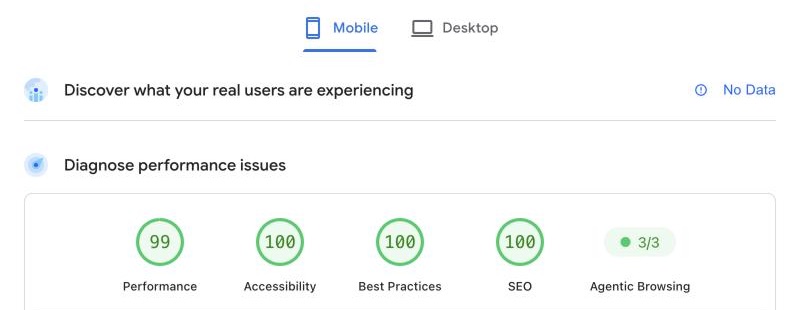
| Field data | Lab data | |
|---|---|---|
| Where | At the top | Further down |
| What it is | What real Chrome users experienced on your site over the last 28 days | A single test on a simulated mid-range phone on a mobile network |
| Why it helps | This is the one that matters | The suggestions under it point to what to fix |
If your site doesn't get enough visitors, the field data section shows data for your whole site instead, or nothing at all.
The numbers to watch
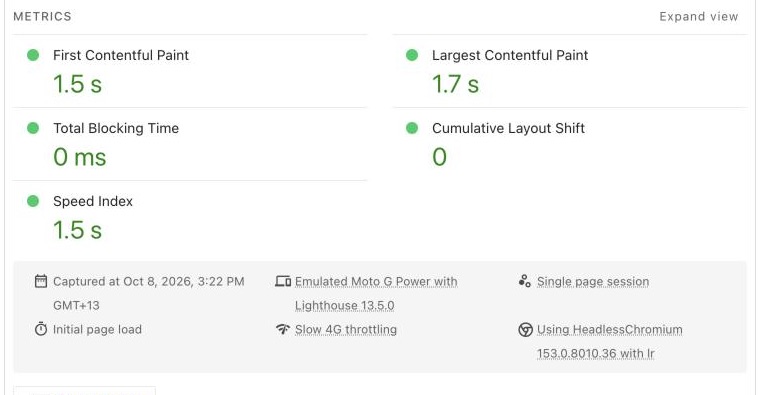
The three Core Web Vitals in the field data are:
| Metric | What it measures | Good |
|---|---|---|
| Largest Contentful Paint (LCP) | How long the main content takes to appear | 2.5 seconds or less. Over 4 seconds is poor. |
| Interaction to Next Paint (INP) | How quickly the page responds when someone taps something | 200 milliseconds or less |
| Cumulative Layout Shift (CLS) | How much the page jumps around while it loads | 0.1 or less |
The usual causes, and what to do
Images that are too big
A photo straight off a phone or camera can be several megabytes. A phone has to download all of it to show a picture a few centimetres wide.
- Resize images before you upload them. Most don't need to be wider than the space they fill on screen.
- Use WebP or AVIF instead of JPG or PNG. They're much smaller for the same quality.
- Set a width and height on images. Without them, the page jumps as each image loads, which hurts CLS.
The big header at the top
Whatever is largest at the top of the page is usually what LCP measures. A full-screen slider, background video or huge hero photo makes that slow. One compressed image beats a slider of five.
Too many plugins and scripts
Every plugin and add-on can load its own code on every page. On a phone, all of that has to download and run before the page responds properly, which shows up as poor INP.
- Delete the plugins you don't use. WordPress's own guidance says this is the first and easiest place to start.
- Don't run two tools that do the same job.
Not sure what a plugin does? Switch it off and test before deleting it. If something breaks, see a plugin update broke my site.
Chat, tracking and embed widgets
Chat bubbles, tracking pixels, booking widgets, social feeds and embedded maps or videos all load code from other companies' servers. Google's advice is to keep only what you use and clear out the rest regularly, such as old tracking codes from a past agency.
If you need a chat widget, look for one that only loads the full chat when someone taps the button.
Hosting far away, with no caching
If your server is in the US or Europe, every visitor in New Zealand waits for data to travel there and back. Cheap shared hosting can also be slow to respond. Google suggests a server response time (TTFB) of 0.8 seconds or less.
- Caching saves a ready-made copy of each page so the server doesn't have to build it for every visitor. On WordPress, a caching plugin does this, and some hosts build it in.
- A CDN keeps copies of your site's files on servers around the world, including closer to your visitors.
If your host can't offer either, it may be time to move to a new host. On Wix or Squarespace you can't change the hosting, so focus on images, apps and embeds. If you're thinking of leaving anyway, see Wix and Squarespace price rises.
Does speed affect Google rankings?
It can, but it isn't the main thing. Google says Core Web Vitals are used by its ranking systems, but a good score doesn't guarantee top rankings, and relevant content comes first.
Speed matters more to your customers than to Google.
When to get help
You can do the image work and the plugin clean-out yourself. Get help if:
- Your score is still poor after fixing the images and removing what you don't need.
- PageSpeed Insights points at server response time, and your host can't improve it.
Speed slips as plugins and content pile up, so check it as part of website maintenance. For a second opinion, our free website check includes a look at how your site loads on a phone.