Google only removes reviews that break its content policies. A review that's harsh, unfair or just wrong about your service usually stays up. Your job is to show Google which rule a review breaks, then reply calmly in public while you wait.
1. Check whether the review breaks a rule
Google's help page on reporting reviews says not to report a review just because you disagree with it. Google doesn't get involved in disputes between businesses and customers.
So start with its Maps content policy. The rules most likely to fit a fake review:
| Rule | What it covers |
|---|---|
| Fake engagement | Reviews must be based on a real experience. Posting content on a competitor's business to damage its reputation is against the rules |
| Conflict of interest | Current or former employment, contractual relationships, competitors and family ties |
| Off-topic | Reviews should be about an experience at that place. General political or social commentary and personal rants don't count |
| Harassment and hate speech | Threats, abuse and content attacking people for who they are |
| Personal information | Your home address, a staff member's phone number, or other private details shared without consent |
| Offensive content | Includes unproven allegations that someone committed a crime |
If none of these fits, reporting probably won't work. Skip to replying.
2. Report it
There are two ways, both in Google's reporting guide.
From the Reviews Management Tool. This route is better because it lets you track the report afterwards.
- Open the Reviews Management Tool.
- Confirm your email and pick your business.
- Choose Report a new review for removal.
From your Business Profile.
- Open your profile and choose Read reviews.
- Select the report icon next to the review.
- Pick the reason that fits and send the report.
3. Check the status, and appeal once
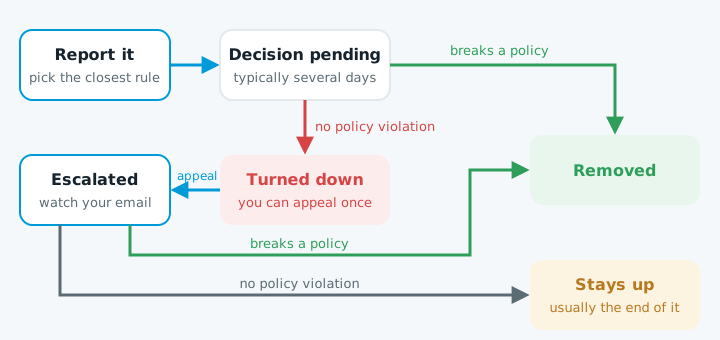
Google says it typically takes several days to look at a report. The Reviews Management Tool shows where it's up to:
| Status | What it means |
|---|---|
| Decision pending | Still being looked at |
| Report reviewed, no policy violation | Turned down. You can appeal this once |
| Escalated | Your appeal is being looked at. Watch your email |
To appeal, open the tool and choose the option to check the status of a review you reported before. You can appeal up to 10 turned-down reviews at once. If Google decides the review breaks its policies, it removes it. If not, that's usually the end of it.
4. Reply in public while you wait
Your reply appears under the review in your business's name, and the reviewer is notified. Customers will read it long before Google decides anything.
Google's own tips are sensible:
- Be professional and polite.
- Keep it short.
- Don't share anyone's personal information.
- Apologise when it's warranted.
For a review you think is fake, something like this works:
Thanks for the feedback. We can't find a record of a job under this name, and we'd like to sort out any problem. Please give us a call so we can talk it through.
It's calm, it tells the next customer something is off, and it accuses no one.
Don't argue or guess who wrote it. Google checks replies too, and may ask you to edit one that breaks its rules.
5. Don't fight fakes with fakes
The best answer to one bad review is a steady flow of real ones. Ask every customer, not only the ones you expect to be happy.
New Zealand law matters here too. The Commerce Commission says reviews must be genuine and must not mislead readers. It has taken a retailer to court under the Fair Trading Act, alleging staff posted reviews without saying they worked there.
More on asking for reviews properly is in our Business Profile setup guide.
When to get help
You can do all of this yourself. It's worth getting help when:
- A run of bad reviews arrives at once from people you've never dealt with.
- Your appeal has been turned down and the review is clearly not from a customer.
- A review makes a serious false claim, such as accusing you of a crime. Talk to a lawyer. Google also has a separate form for reporting content on legal grounds.
For a second opinion on how your profile and website look to a new customer, start with our free website check.