If Google has suspended or disabled your Business Profile, it thinks something on it breaks its guidelines. Fix that first, then appeal through Google's appeals tool with documents that prove your business is real and at the address you've given.
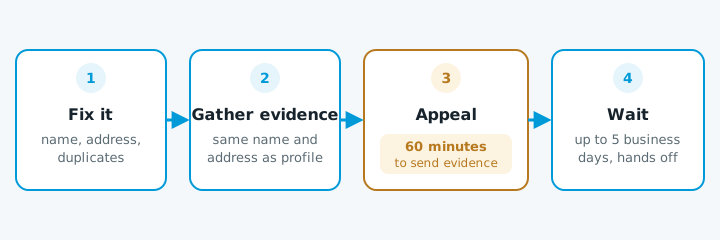
1. Don't make a new profile
This is the mistake that turns a fixable problem into a long one. Google's rules also allow only one profile per location, so a second one is a fresh breach.
2. Work out what Google didn't like
Open the appeals tool and select your profile. It shows the restriction and links to the policy Google says you broke. Then check the profile against Google's guidelines.
The usual problems:
| Problem | Google's rule | Fix |
|---|---|---|
| Extra words in the business name | The name should be your real name, as on your signage and invoices. No taglines, service keywords, locations or phone numbers | Use the real name. "Smith Plumbing" is fine. "Smith Plumbing Hamilton 24/7 Emergency Plumber" isn't |
| An address you don't work from | PO boxes and mailboxes aren't allowed. A virtual office only counts if it has your signage and is staffed by your own people during business hours | Use the address you actually work from |
| Your home address showing when customers don't come to you | If you work from home and go to your customers, Google says to clear the address and show service areas instead | Clear the address and set service areas. Our setup guide covers how |
| More than one profile for the same place | One profile per location. Old duplicates, or a second profile someone made "to be safe", count | Keep one profile |
Fix whatever is wrong before you appeal. An appeal for a profile that still breaks the rules is likely to be turned down.
3. Get your evidence ready before you start
Google lets you attach evidence after you submit the appeal. But once you open the evidence form, you have 60 minutes to send it, so have the files ready first.
Google's appeals page lists the kinds of document it accepts:
- Official business registration, such as your Companies Office record if you're a company.
- A business licence.
- A tax certificate.
- A utility bill, such as power, phone or internet.
The name and address on the documents should match what's on the profile. If your power bill is in your personal name at a different address, it won't help much. Pick the documents that show the same business name and address Google sees.
Write a short, factual note: what the business is, where it works, and what you've changed. Don't argue with Google about the rules.
4. Submit and wait
- Appeal through the tool and attach the evidence.
- Leave it alone. Google says decisions can take up to five business days, and asks you not to send more appeals for the same issue before you hear back. Don't keep editing the profile while it's under review either.
- Watch the status in the appeals tool.
- If the profile comes back, check every field is still right.
If the appeal is turned down, read the reason. It usually points to something that still doesn't match, often the name or address. Fix that, gather better evidence, and try again through the same tool.
When to get help
You can do all of this yourself, and plenty of owners do. It's worth getting help when:
- You can't tell what rule you broke, or you've fixed what you think it is and been turned down.
- Your documents don't match your profile, for example you trade under a different name from your registered company.
- Someone else set the profile up and you don't control the Google account.
- The profile is where most of your work comes from, so every week offline costs you jobs.
If you're not sure whether your profile and website are telling Google the same story, start with our free website check.