"Error establishing a database connection" means WordPress can't reach the database that holds your content, usually because the login details are wrong or the database server is down. A 500 error means the server hit a problem it couldn't name, most often a broken .htaccess file, a plugin or theme, or PHP running out of memory. Neither means your content is gone.
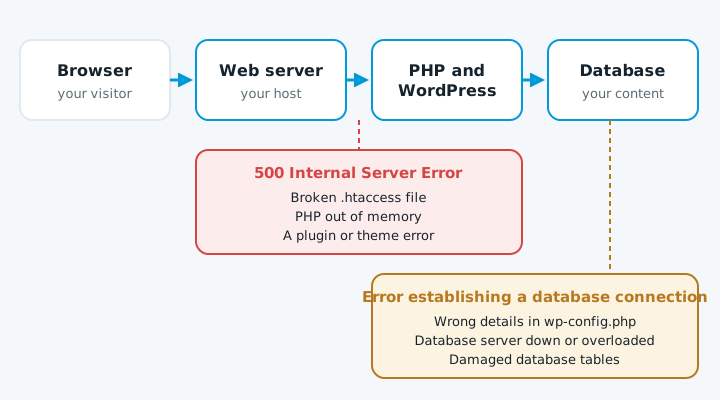
If you see "There has been a critical error on this website" instead, a plugin or theme has crashed. Follow a plugin update broke my site.
Database connection error
- Ask your host if the database server is down or over its quota. It's the quickest check.
- Check
wp-config.php. In your hosting file manager, compareDB_NAME,DB_USER,DB_PASSWORDandDB_HOSTwith the database and user in your control panel. A changed password or a recent move often leaves old details here. - Repair the tables if WordPress asks. If you see "One or more database tables are unavailable", add
define( 'WP_ALLOW_REPAIR', true );towp-config.phpabove "That's all, stop editing!", then openyourdomain.co.nz/wp-admin/maint/repair.phpand click Repair Database. Remove the line straight after, because while it's there anyone can open that page without logging in. - Rule out a hack. If everything checks out and the error keeps coming back, see website hacked.
500 error
- Read the error log. In cPanel it's under Metrics, then Errors. The newest lines often name the file or plugin at fault.
- Rename
.htaccessto.htaccess_oldin the site's main folder and reload. If the site comes back, go to Settings, then Permalinks and click Save Changes to make a fresh one. - Switch off plugins by renaming
wp-content/pluginstoplugins-off. If the site returns, rename it back and turn plugins on one at a time. - Switch theme by renaming your theme's folder in
wp-content/themes. - Ask your host to raise the PHP memory limit if the log says memory was exhausted.
An old PHP version can also cause a 500 after a plugin update. See PHP version out of date.
When to get help
If nothing works, restoring a backup from before the problem is often the fastest way back. Hand it over if you can't get into your hosting control panel, the repair tool doesn't fix the tables, or you have no recent backup. Editing wp-config.php or the database by hand without a backup can turn a short outage into lost content.
If your site is down now, talk to us.