If your site broke straight after a plugin update, that update is almost certainly the cause. Switch that one plugin off and the site usually comes back. Your content is still there.
You might see "There has been a critical error on this website", a blank page or a broken layout. If you didn't update anything, start with the website down checklist.
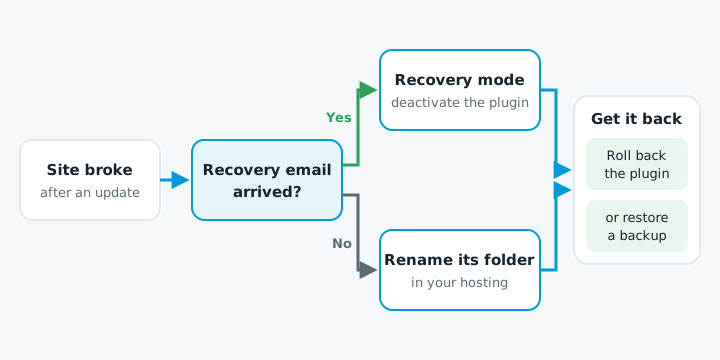
Switch the plugin off
- Check the admin inbox. WordPress emails the site's admin address with the subject "Your Site Is Experiencing a Technical Issue". It names the plugin and links to recovery mode. Check spam too.
- Use recovery mode. Click the link, log in, go to Plugins and deactivate the one named. The link expires after a day.
- No email? Rename the folder. In your hosting file manager or FTP, go to
wp-content/plugins/and rename the plugin's folder, for examplecontact-form-7tocontact-form-7-off. WordPress deactivates it. - Not sure which plugin? Rename the whole
pluginsfolder toplugins-off, log in, rename it back and turn plugins on one at a time until it breaks again.
Get the old version back
A booking form or shop plugin can't stay off for long.
| Option | How | Watch out |
|---|---|---|
| Roll back the plugin | The free WP Rollback plugin restores an earlier version of plugins from WordPress.org. For paid plugins, the developer's account area often has older versions. | Turn off auto-updates for that plugin until a fix comes out. |
| Restore a backup | A backup from before the update puts everything back as it was. | New orders or form entries since then may be lost, so note them first. |
Then tell the developer which version broke and your WordPress and PHP versions. A fix is often already on the way.
Stop it happening again
- Back up before every update, and keep the backup somewhere other than the server.
- Update one plugin at a time and check the site after each.
- Test on a staging site first for shop or booking plugins.
- Read the auto-update emails. If nobody checks the site after an automatic update, a fault can sit there for days.
More in website maintenance in NZ.
When to get help
Hand it over if you can't get into your hosting or FTP, or you have no recent backup. Also get help if the plugin changed its data when it updated, as shop, form and page builder plugins often do. Rolling back won't undo that, and restoring a full backup is the safer route.
If you're not sure what state your site is in, our free website check shows what's out of date.