Don't start deleting things. Tell your host, change every password, then find out how they got in before you clean up, or it will happen again.
Signs your site has been hacked
- Visitors get sent to spam, gambling or fake pharmacy sites.
- Google or Chrome shows "This site may be hacked" or "Deceptive site ahead".
- Your host has suspended the account.
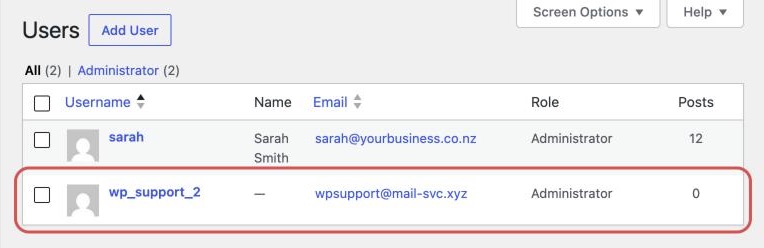
- WordPress has admin users you don't recognise.
- Searching
site:yourdomain.co.nzshows pages you never made.
If customers see spam but the site looks fine to you, see website redirects to spam.
The first hour, in order
- Tell your host and ask for backups from before the hack.
- Change every password from a computer you trust: hosting first, then WordPress admins, FTP and the database, then the email tied to the site.
- Turn on two-factor login for hosting, the domain registrar and email.
- Check for unknown admin users in WordPress under Users. Note any you don't recognise, then remove them.
- Take a copy of the files and database as they are now, as evidence.
Customer information and who to tell
If the site holds customer details, assume they may have been seen. Under the Privacy Act 2020, a breach that has caused or is likely to cause serious harm must be reported to the Privacy Commissioner, and the people affected must be told. The Commissioner asks for this within 72 hours. See the Privacy Commissioner's guidance.
You can also report it to the NCSC at ncsc.govt.nz/report or 0800 114 115. If your email was broken into, warn customers about fake invoice scams.
Cleaning it up
| Option | The catch |
|---|---|
| Restore a backup from before the hack, then update everything | Hackers often get in weeks before it shows, so the backup may be infected |
| Pay someone to clean it | You give them access to the hosting |
Either way, close the way in: usually an old plugin, a weak password or a leaked login. A restore leaves it open.
If Google flagged the site, open Search Console, go to Security issues and click Request review once the whole site is clean. Reviews can take weeks. Then keep it updated and backed up with regular website maintenance.
When to get help
Malware hides in the database, in harmlessly named files and in scheduled tasks that reinstall it. Miss one piece and you start again. If customer data is involved, you also need to know what was taken.
If you're not sure whether your site is affected, start with our free website check.