Your site runs on a PHP version that no longer gets security fixes, or soon won't. Upgrading is usually a setting in your hosting panel, but back up and update your plugins first, because an old plugin can stop working when PHP changes.
What PHP is and which versions are supported
PHP is the language WordPress is written in. It runs on your host's server, so WordPress can't update it. Each version gets four years of fixes.
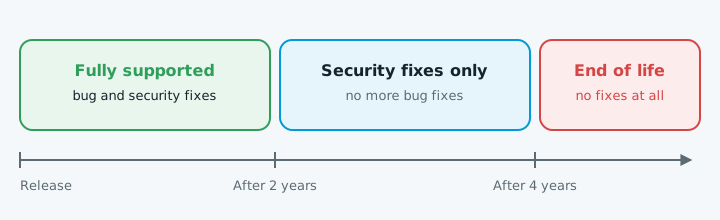
As of October 2026, according to php.net:
| Version | Status | Security fixes until |
|---|---|---|
| 8.5 | Fully supported | 31 Dec 2029 |
| 8.4 | Fully supported | 31 Dec 2028 |
| 8.3 | Security fixes only | 31 Dec 2027 |
| 8.2 | Security fixes only | 31 Dec 2026 |
| 8.1 and older | End of life | Ended 31 Dec 2025 or earlier |
WordPress recommends PHP 8.3 or newer.
How to upgrade safely
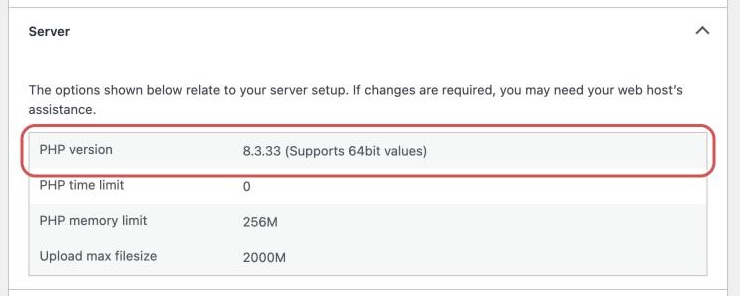
- Check your version. In WordPress, go to Tools > Site Health > Info and open Server.
- Back up the files and database somewhere other than the server.
- Update WordPress, the theme and plugins one at a time, checking the site after each.
- Replace plugins that haven't been updated in a year or more, and check paid ones for PHP 8 support.
- Switch PHP. Use a staging site if your host has one. On cPanel, open MultiPHP Manager, tick your domain, choose a version and click Apply. If you're far behind, go up in steps.
- Test straight away: a few pages, a test enquiry, logging in, and anything that takes money or bookings.
If it breaks
You'll usually see "There has been a critical error on this website", a blank page, or a feature that stops working.
Then update, replace or report the plugin that failed. If switching back doesn't fix it, WordPress advises asking your host to restore the previous PHP version, then restoring your backup. If a plugin update caused it, see when a plugin update breaks your site.
When to get help
Get someone in if nobody knows what's in the site, a plugin you rely on has no PHP 8 version, the theme itself is the problem, or switching back didn't fix it. If your host won't let you change versions, it may be time to move host.
To see what else is out of date, start with our free website check.