If customers say your site sends them to spam but it looks fine to you, it has almost certainly been hacked.
Start with what to do in the first hour: tell your host, change passwords and check for unknown admin users.
Why you can't see it
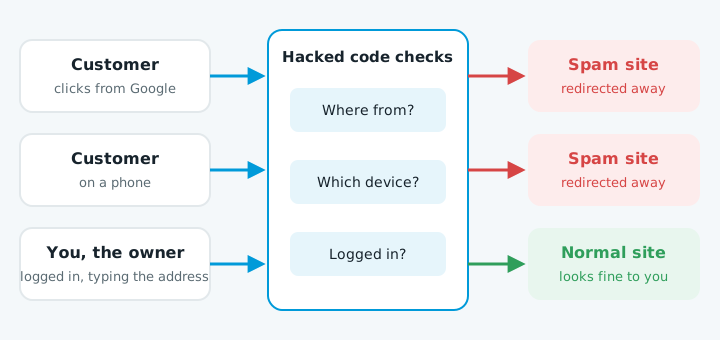
The hacked code checks each visitor first. It may redirect only people who came from Google, only phone users, or only visitors who aren't logged in, so the owner never sees it.
The "Japanese keyword hack" is related. It creates pages of Japanese text linking to shops selling fake brand goods.
How to confirm it
- Search Google for
site:yourdomain.co.nzand look for addresses you don't recognise or titles in another language. - Click a result on your phone in a private tab, from Google rather than typing the address. Try a few times.
- Open Security issues in Google Search Console. It names the type of hack and lists some affected pages.
- Run an odd address through URL Inspection with a live test. It shows what Google actually gets.
- Check Settings, then Users and permissions. An owner you don't know is a strong sign of a hack.
Where it hides
On WordPress, look in .htaccess for rules that check where a visitor came from, in wp-config.php, index.php and the theme's functions.php, header.php and footer.php, in the database, in fake plugins with security-sounding names, and in scheduled tasks. The code is usually scrambled: long random strings and words like eval or base64_decode.
Deleting the spam pages doesn't work. Code elsewhere makes them, and a second copy often waits to reinstall it. Google's cleanup advice is to replace .htaccess with a clean version, reinstall WordPress and every theme and plugin from fresh copies, then check what remains. The way they got in still needs closing.
Getting Google's warning removed
Google keeps "This site may be hacked" until the whole site is clean. Fixing some pages isn't enough. Then:
- Remove Search Console owners you don't recognise, and their verification files.
- Check your sitemap for spam addresses.
- Run the old spam addresses through URL Inspection to confirm they're gone.
- In Security issues, click Request review and say what you found and fixed.
Reviews can take several days or weeks. After that, keep the site updated with regular website maintenance.
When to get help
Get someone in if you can't find the code, the spam comes back after you cleaned it, there are files you don't understand, or you can't get into your hosting.
If you're not sure whether your site is affected, start with our free website check.