A default page means a web server answered but didn't find your website: the files are missing or in the wrong folder, or your domain points at the wrong server. The page you see tells you which.
| What you see | What it usually means |
|---|---|
| Your host's name, or a cPanel or Plesk logo | The server has nothing to show for your domain |
| "Index of /" and a list of files | The folder has no homepage file |
| "Apache2 Default Page" or "Welcome to nginx!" | Your domain points at a different server |
| A parked page or registrar ads | The domain has probably expired |
| "Account suspended" | Your host has switched the account off |
A host welcome or placeholder page
Usually the account is still empty, the files are one folder too deep (in cPanel they belong in public_html, not public_html/mysite/), or the domain is switched off in Plesk.
Open your hosting file manager and look in the domain's document root. If it's empty, upload the site or restore it from a backup. If the files are in a subfolder, move them up a level.
"Index of /"
The server found the folder but no homepage file, such as index.html or index.php. A WordPress site needs index.php in the document root. If it has gone and nobody changed anything, read website hacked before you restore it. Don't leave the list up, as anyone can browse your files.
Apache, nginx, parked or suspended
- Apache or nginx default page. Your domain most likely points at an old server or a new one that was never finished, often after a move to a new host.
- Parked page. Log in to your registrar and check the expiry date. See domain expired.
- Account suspended. Check your email for the host's reason. An unpaid invoice is the usual one. After malware, the host will want the site cleaned first.
Check where your domain points
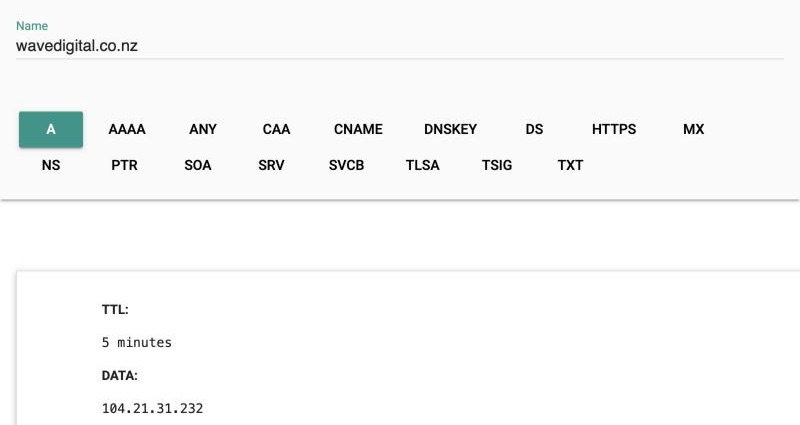
- Look up the A record for your domain in Google Admin Toolbox Dig. That's the IP address your site is served from.
- Check
wwwtoo, as it can point elsewhere. - Compare the address with the one in your hosting panel or welcome email. If they don't match, change the A record wherever your DNS is managed. It can take a few hours to reach everyone.
When to get help
If the files are there, DNS matches and the default page still shows, the problem is in the server's setup and your host should fix it. Get help sooner if the files have gone with no backup, or the account was suspended for malware.
If you can't get it back yourself, talk to us.