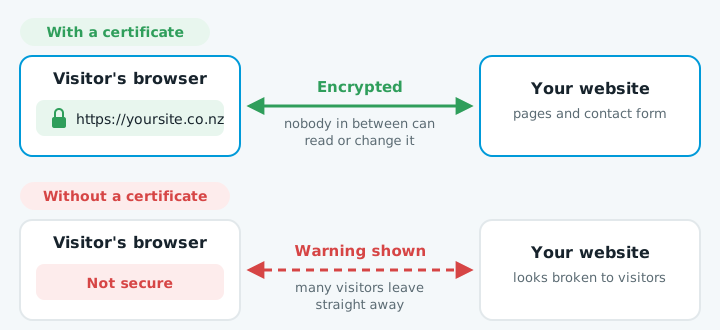
An SSL certificate puts the padlock next to your website's address and makes it start with https://. It encrypts everything between your visitor's browser and your website, so nobody in between can read or change it. For almost every small business, a free one is all you need.
Why a business website needs one
Browsers warn visitors about sites without a working certificate, and many leave straight away. The certificate also encrypts the names, phone numbers and messages people send through your contact form, and Google has used HTTPS as a ranking signal for years. Without one, your site looks broken.
Free or paid
Free certificates from Let's Encrypt, or the ones included by Cloudflare and most good hosts, give the same encryption and the same padlock as paid ones.
| Free certificate | Paid certificate | |
|---|---|---|
| Encryption | Same | Same |
| Padlock | Same | Same |
| Identity checks on the company | No | Yes |
Paid certificates check the company behind the site, but browsers no longer show visitors anything different. Unless a bank, government agency or client contract asks for a specific type, choose a free one.
Renewal has to be automatic
Every certificate expires, and industry rules keep shortening how long one can last. From March 2026 the maximum is 200 days, and it drops further over the next few years, so renewing by hand once a year no longer works. Most hosts and Cloudflare renew automatically.
Check yours
- Click the padlock, or the "Not secure" label, next to your address in the browser. It shows whether the connection is secure.
- Open the certificate details to see when it expires.
When to get help
If a warning is showing now and you can't find why, or your host doesn't renew certificates automatically, it's worth handing over. A lapsed certificate turns customers away until it's fixed.
If your site shows a warning, talk to us.