The browser couldn't confirm your site's security certificate: it has expired, doesn't cover the address typed, or isn't there. The code under the warning tells you which. If you're not sure what a certificate is, see what an SSL certificate is.
Check the certificate
Click Not secure next to the address, open the certificate and check its dates and the names it covers. Or run your domain through the free SSL Labs server test.
Match the error code
| What you see | What it means | The fix |
|---|---|---|
| NET::ERR_CERT_DATE_INVALID | Expired certificate, or a wrong clock on one device | Reissue it, or fix the device's time |
| NET::ERR_CERT_COMMON_NAME_INVALID | It doesn't cover the name typed, such as www | Reissue it for every name you use |
| NET::ERR_CERT_AUTHORITY_INVALID | After a move, the new host's default certificate | Issue one on the new host once DNS switches |
| Not secure, page still loads | The page came over plain http:// |
Redirect http:// to https:// |
Expired certificate
Certificates are short-lived (Let's Encrypt's last 90 days, and the industry cap drops to 47 days by March 2029), so renewal is automatic. An expired one means renewal failed, usually after a DNS or hosting change pointed the domain somewhere else.
- Reissue it in your hosting panel. In cPanel, look under SSL/TLS Status or AutoSSL.
- If it fails again, check DNS points your domain at this host.
- On Cloudflare, check its SSL settings too.
Wrong name or a new host
If the certificate covers yourbusiness.co.nz but not www.yourbusiness.co.nz, the www version gets a warning. Reissue it for every name you use and redirect the extras to your main one.
After a move to a new host, issue the certificate in the new host's panel once DNS has switched. If the domain has lapsed, see what to do when your domain expires.
'Not secure' without a full warning
The page came over plain http://. Set the site to redirect every http:// address to https://; most hosting panels have a switch for this.
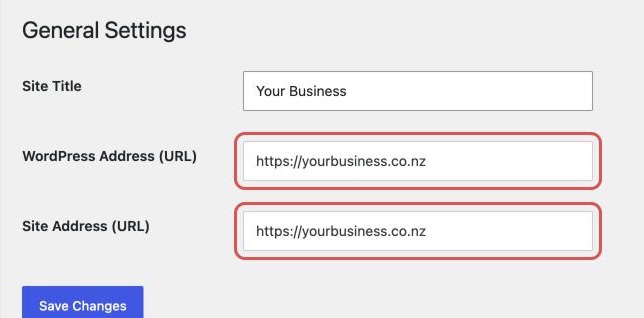
If styling is missing, the page may load files over http://. On WordPress, check both addresses in Settings > General start with https://, then back up and update old links with a plugin such as Better Search Replace.
If the warning shows on only one device, check its date and time. A wrong clock causes NET::ERR_CERT_DATE_INVALID, and your site is fine.
When to get help
If reissuing fails or your panel can't issue one, send your host the domain, the error code and a screenshot. Treat it as urgent: customers can't tell your warning from a real attack.
Once the padlock is back, our free website check looks over the rest of your site.