Fill in your own contact form and see whether the email arrives. Most broken forms fail silently, so a lost enquiry is a customer who thinks you ignored them.
Test it now
- Open your website on your phone, not logged in.
- Fill in the form with a personal email address, not your business one, and a message like "Test, please ignore".
- Submit it and note the time.
- Check the inbox the form sends to, then spam and any "Other" or "Promotions" tab.
If it reached the inbox within a few minutes, you're fine. If not, read on.
On WordPress
Check whether the entry was saved. Gravity Forms keeps entries under Forms, then Entries. WPForms keeps them on paid plans only. Contact Form 7 needs its free Flamingo plugin. If the entry is saved, the email is the problem. If not, the form itself is broken.
Send through a real mailbox. By default WordPress sends through the server's PHP mail, which many hosts limit and which carries no proof it came from your domain. An SMTP plugin such as WP Mail SMTP or FluentSMTP sends through your Google Workspace or Microsoft 365 account, or a sending service, which signs it properly.
Fix the From address. The email should come from your own domain, such as website@yourbusiness.co.nz, with the visitor's address in Reply-To so you can still hit reply.
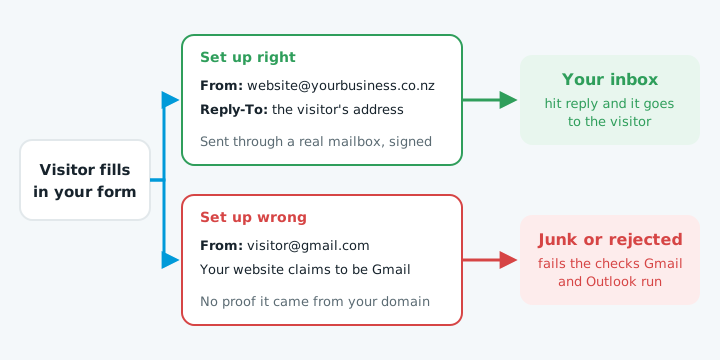
SPF records, DMARC and why emails go to junk explain those checks.
Check the notification address. It's often an old staff member, a typo or a mailbox nobody reads. If it's bouncing, see emails bouncing back.
On Wix or Squarespace
Sending is handled for you, so check the settings. On Wix, check who gets notified in the form's settings; submissions also show in your dashboard. On Squarespace, open the form block's settings and check the Storage tab has the right email address. Check spam on both.
Keep it working
- Send a test enquiry once a month. Forms break after plugin updates, password changes and new spam filters.
- Try the form on a phone if you've added reCAPTCHA or Turnstile.
- Turn on entry storage if your plugin offers it.
When to get help
If your test doesn't arrive and these steps don't fix it, the cause is usually in the SMTP setup or your domain's email settings.
Our free website check sends a clearly marked test enquiry through your form and tells you whether it reached you.