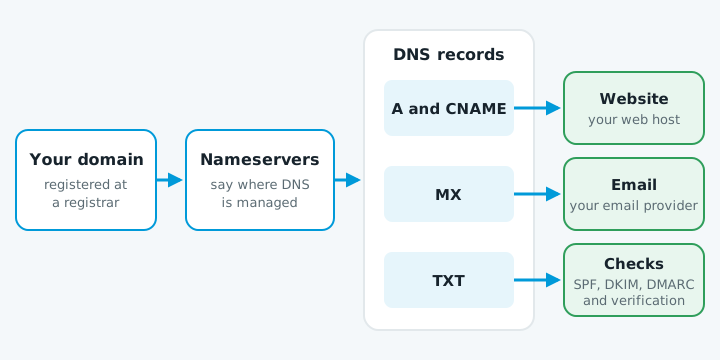
DNS records say where your website lives (A and CNAME), where your email goes (MX) and who may send email as you (TXT). You rarely need to touch them, but one wrong change can stop your website or email working.
Find where your DNS is managed
Your nameservers decide where your records live: your registrar, your web host, or a service such as Cloudflare. Check them in your registrar account. If they're ns1.yourhost... or contain cloudflare.com, edit there. Changes anywhere else do nothing.
The records
| Record | What it does | Example |
|---|---|---|
| A | Points a name at a server's IPv4 address, usually your website | 203.0.113.10 |
| AAAA | The same, for IPv6 | 2001:db8::10 |
| CNAME | Makes one name an alias of another | www → yourbusiness.co.nz |
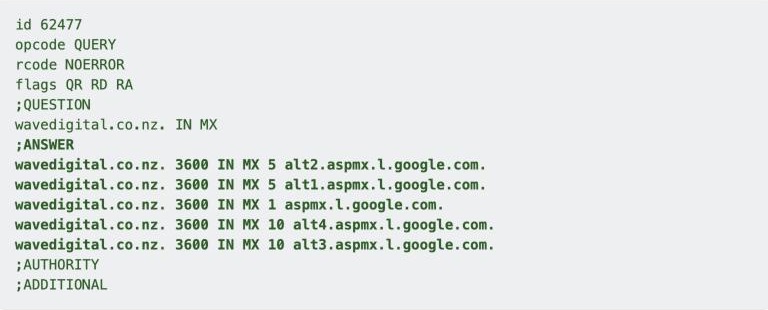
| MX | Receives your email; the lowest priority number is tried first | smtp.google.com, priority 1 |
| TXT | SPF, DKIM, DMARC and ownership checks | v=spf1 include:_spf.google.com ~all |
| NS | The nameservers that hold your DNS | ns1.yourhost.example |
See adding an SPF record and DMARC explained. Leave verification records, such as Google Search Console's, in place.
Each record has a TTL, the seconds other servers remember it. At 86400, a change can take up to 24 hours, so lower it a day before a planned change (see moving your website to a new host).
Look up your own records
- Open Google's free Dig tool.
- Type your domain without
wwworhttps://. - Click a record type to see each value and its TTL.
Keep a copy before you change anything. It's your way back.
Mistakes that break things
Two SPF records. A domain can have only one, and with two the check fails. Merge new senders into the existing record.
A CNAME on the root domain. A CNAME can't sit with other records, and the root always has some. Use an A record for the root, or Cloudflare's CNAME flattening.
Losing email records when you move nameservers. Check MX, SPF, DKIM and DMARC exist at the new provider before you switch.
If your site shows your host's welcome page after a change, see website shows the hosting default page.
When to get help
Get help if you can't log in to wherever your DNS is managed, you're changing website and email at once, or a change has already stopped email arriving. Email problems often go unnoticed until a customer asks why you never replied.
To see how your site looks from outside, try our free website check.