Film one unbroken video of at least 30 seconds that shows where the business is, proof it exists, and proof that you run it. Record it live on your phone from inside your Business Profile. Google doesn't accept a video recorded earlier.
Google only offers video when it suits your profile. Our setup guide covers the other methods.
The rules
Google's video verification page says the recording must be one unedited take with no breaks, at least 30 seconds long, and recorded live in your Business Profile, not uploaded from your camera roll. It must not show bank account, tax or ID numbers, private information, or other people's faces.
Your shot list
Plan the route and walk it once without filming.
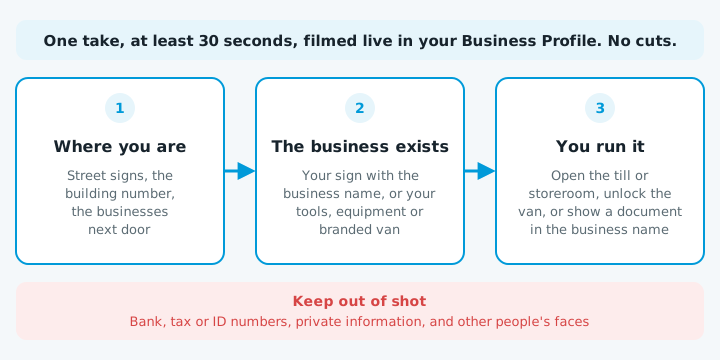
| Shot | Shop or office customers visit | Service-area business, such as a plumber |
|---|---|---|
| 1. Where you are | Street signs, the building number, the businesses next door | Street signs or landmarks near your base |
| 2. The business exists | Signage with the business name on something permanent | Your tools, equipment, branded clothing or workspace |
| 3. You run it | Something only staff can reach, such as the till, storeroom or EFTPOS system | Unlocking your signwritten van, part of a job, or an invoice or bill in the business name |
The name on your signage or documents must match the name on your profile.
Recording and uploading
- Open your Business Profile on your phone and tap Get verified.
- Tap Business video, then Next, and allow access to your location, camera and microphone.
- Record the whole route in one go, past 30 seconds.
- Watch it back. If something's missing or blurry, tap Try again.
- Tap Upload video.
Google says the review can take up to five business days.
If it's turned down
Google flags videos where the business name isn't visible on the storefront, no nearby area is shown, or there's no proof you're authorised to run the business.
Tap Review issues in your profile, read the reasons, then record a new video with everything from the first one plus what was missing. If video keeps failing, try another method if Google offers one. Online-only businesses with no in-person service aren't eligible for a profile.
Verified but not visible? See not showing on Google Maps.
When to get help
It's worth getting help if your signage, documents and profile don't all show the same name, or Google has turned down more than one video. Start with a free website check.