To get an address like you@yourbusiness.co.nz, you need a domain name and an email provider such as Google Workspace or Microsoft 365. You then add a few records to your domain so email reaches the provider and your sent email is trusted.
A @gmail.com or internet provider address doesn't look like your business, and you don't control it. An address on your own domain is yours, even if you change email provider later.
What you need
| You need | What it is | Cost |
|---|---|---|
| A domain | Your name online, such as yourbusiness.co.nz |
A yearly fee to a registrar |
| An email provider | Holds your mailboxes | A monthly fee per person |
| Access to your DNS | Where your domain's records live: registrar, web host or Cloudflare | Free |
For costs, see Google Workspace pricing in NZ. To compare providers, see Google Workspace or Microsoft 365.
Setting it up
- Check your domain is registered in your business's name, and find your registrar.
- Sign up with a provider and add each person who needs an address.
- Prove you own the domain by adding the TXT record the provider gives you.
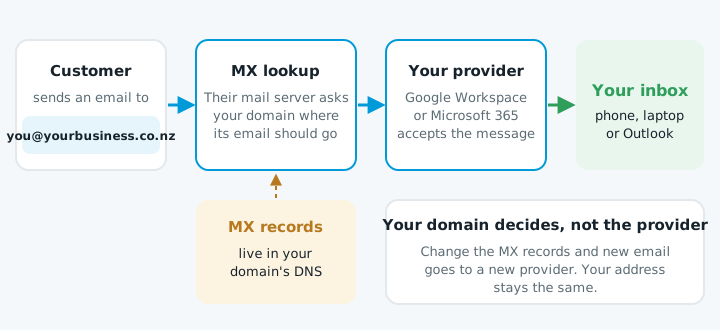
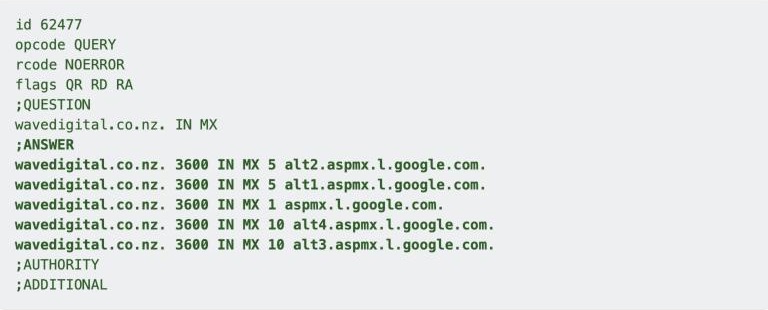
- Point your MX records at the provider and remove any others. For Google Workspace accounts started from 2023, that's a single record,
smtp.google.com, priority 1. - Add SPF, DKIM and DMARC so other mail servers trust your email. Without them, quotes often land in spam. See adding an SPF record and DMARC explained.
- Move your old email across with Google Workspace's data import tool, if the old account supports IMAP.
Older accounts like ours use five aspmx records instead, which Google says is fine if they work.
Can I just forward it to Gmail?
Forwarding handles incoming email, but replies come from your Gmail address unless you set up Gmail's "Send mail as", which needs an outgoing mail server for your domain. Google has also said Gmail will stop supporting it for addresses such as @outlook.com from January 2027. For the address you send quotes from, get a proper mailbox.
When to get help
The setup is quick, but a wrong or missing record can stop email arriving or send it to spam without anyone telling you. If you'd rather it was done right the first time, talk to us.